3 Ways to Analyze and Scan for Keyword Cannibalization
 Written by James Parsons • Updated April 15, 2026


Keyword cannibalization is, quite possibly, one of the most misunderstood concepts in content marketing.
Keyword cannibalization is a real issue, but it's not necessarily as dangerous or as clear-cut as many people make it seem. There's more depth to it than just keywords, after all.
But it's not one of those problems where it's not actually worth worrying about, so I'm not going to tell you to ignore it. Instead, let's go over the details, learn what keyword cannibalization really is and how it works, how to analyze and look for it, and how to fix it when you find it.
Key Takeaways
- Keyword cannibalization requires overlap in primary keywords, search intent, AND content type - not just similar keywords alone.
- Semrush's Cannibalization Report and Moz's Keyword Explorer can identify overlapping pages, but both require manual judgment to confirm real issues.
- Manual analysis using Google Search Console query filters, SpyFu, and historic ranking data provides the most accurate cannibalization assessment.
- Fixing cannibalization options include 301 redirects, merging pages, or splitting content into distinct, interlinked pieces targeting narrower subtopics.
- Keyword cannibalization affects small sites far more than large ones; big brands can rank multiple times for the same keyword.
Table of Contents
What is Keyword Cannibalization, Really?
Most people think of it in terms of having multiple pages that cover the same keywords, dividing potential traffic and interest and leaving both under-ranking compared to their value.
This is close to the truth, but it treats search ranking as a zero-sum game. As if you have 100 points of value coming in, and if you have one destination for it, it gets all 100 and ranks #1, but if you have two posts on the topic, one gets 75 and one gets 25, and neither ranks in the top 10.
Yes, if you have multiple pages that all cover the same keywords, in the same way, targeting the same audience, they can be taking away from one another.
But remember, a single page can rank for hundreds or even thousands of keywords. Just having some overlap isn't enough to panic over.
In some cases, yes, that overlap is hindering one page from ranking. In a lot of cases, though, there are a ton of reasons why the other page can rank just fine. The pages have to be very similar in a lot of different ways for the overlap to be true keyword cannibalization.
All of this makes it a lot harder than you might expect for an automated tool to analyze keyword cannibalization.
Looking Beyond Keywords
The key is an overlap of, I think, three things. Ahrefs identifies two of them, but I think a third is also relevant.
Attribute 1: Primary Keywords
The first attribute that needs to overlap between two pieces of content for cannibalization to be an issue is the primary keywords the posts are targeting.
Critically, this needs to be the actual primary keywords the content is trying to rank for, and not other keywords that might come up in an analysis of the page. The post you're reading now could rank for "what is keyword cannibalization," but I wouldn't consider it cannibalizing a full guide to the definition of keyword cannibalization, because that's not one of the main keywords I'm aiming for here.
Don't go too far down this rabbit hole. After all, sometimes, keyword overlap is good. Content clustering takes heavy advantage of the fact that multiple pieces of content, approaching the same topic from different angles, have a synergistic effect.
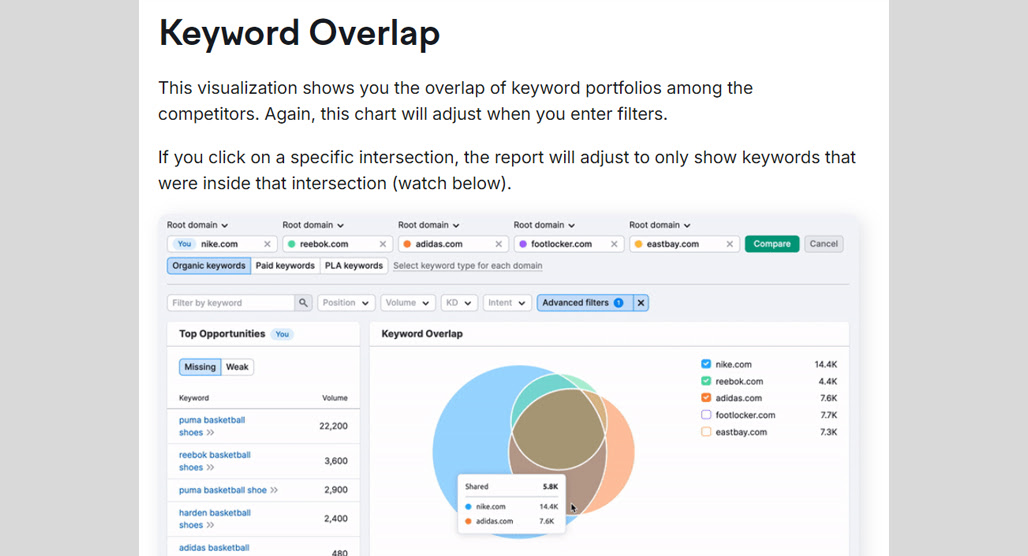
Keyword analysis is just the simplest of the three attributes to analyze, especially using automated tools. It's pretty easy to see what keywords a post is ranking for just by checking that post in the Google Search Console, after all.
Attribute 2: Search Intent
Different kinds of content can target the same keywords with a different intent behind them.
Say, for example, you have a keyword as simple as a lawnmower's model name. The GrassSlasher9000 is a great product for you to sell, with a good commission and a decent value. So, you market around it.
You can target that keyword for multiple search intents.
- Informational. A post about the GrassSlasher9000's tech specs, operational capabilities, and customization options.
- Commercial. A post about the GrassSlasher9000's abilities and how they compare to other lawnmowers.
- Transactional. A post or landing page focused on tangible details and where/how to buy the GrassSlasher9000.
Now, you can argue that each of these has a different primary keyword. "GrassSlasher9000 Specs," "GrassSlasher9000 Comparison," and "Where to buy a GrassSlasher9000" are all different keywords, after all.

So, it really depends on how the content is formulated and how narrowly you target those keywords. They're clearly different kinds of content, after all, so cannibalization issues shouldn't be a problem.
A lot tends to depend on what the user actually wants, despite what they type in. Often, Google can use context and other clues to understand intent when it's less obvious from a keyword directly, but you don't get that benefit, so you just have to cover your bases.
Attribute 3: Content Type
I would argue that even if you have the same keyword and the same intent, you can still have two pieces of content without cannibalization issues if they take different forms. A video embedded into your page, versus a podcast, versus a blog post, versus a landing page; these can all aim to target the same keywords with the same intent, but reach different people because of their format.
Yes, there may technically be some cannibalization here. But different people prefer consuming their content in different ways. Someone who listens to podcasts during their commute can't take their eyes off the road to read a blog post; someone who spends time in noisy environments might prefer to read over listen or watch.

Overall, I set my bar pretty high for cannibalization.
It's also worth mentioning that keyword cannibalization is another one of those SEO quirks that affects small blogs a lot more than big ones. Apple can get away with ranking in the top 10 multiple times for a keyword, but if I tried it, I'd only get one space.
How to Identify Possible Keyword Cannibalization
Let's take a look at three different ways you can scan and analyze your page for keyword cannibalization issues.
Remember, no tool is going to tell you unequivocally that you have keyword cannibalization. You'll have to use your judgment with the information you get from these scans.
Option 1: Use Semrush
The first easy option is to use Semrush. Semrush isn't the cheapest tool around, but it's very powerful, so I like it for a lot of analytical purposes like this. They have a sizable index and awareness of the search results overall, so their data is fairly accurate.
In this case, part of their Position Tracking tool is a Cannibalization Report. Using this tool, you can view your site through the lens of either keyword or page, and check if pages are overlapping or if multiple pages are ranking for the same keyword.

The good part of using this tool is how easy it is. It's just a simple report in their dashboard; it's easy to click around and dig through to different views to get a complete picture of how much overlap there is in your content.
I do have a couple of gripes, though. For one thing, they check the top 100 search results for a given keyword. A page of yours ranking #85 for a keyword isn't really going to be a cannibalization danger to one in the top ten, though. I think it's a little overly broad, so it can flag a lot of "overlaps" that are really tertiary keywords that aren't hurting either post.
I also don't think the visual representations are all that useful, but with the amount of data they're handing you, it's easy enough to slap it into Excel and make your own visualizations if you want.
Option 2: Use Moz
Another of the more trustworthy tools out there is Moz, and their Keyword Explorer does the job here. You do need a paid account (the free version is too limited for cannibalization issues), but that's not a high bar, especially if you already have Moz for other reasons.

The main way you look for cannibalization issues with Moz is by having it analyze the keywords your site ranks for. Just plug in your URL for the Ranking Keywords report and run it. This will give you a list of keywords your site ranks for.
So, how do you find the overlapping keywords? Well, any keyword that has multiple pages ranking for it will have a drop-down next to it. It's an easy visual indicator on the list you can scroll through, and you can flag those for more analysis.
Again, this only indicates multiple pages ranking for the same keyword, not a legitimate cannibalization issue, so you need to do analysis on your own.
Option 3: Manual Analysis
This one is less of a "scan" since it requires more manual poking and prodding at tools to get the data, but I think it's a little more useful because of it. For this, you really only need Google.
First, the Google Search Console. In the GSC, under Performance, you can apply "query" filters. These filters let you plug in a keyword and see the pages on your site that are ranking for those keywords. This will give you a very good picture of whether there are multiple pages ranking for the primary keywords you're checking, but it has one significant drawback: you need to know what keywords to check.
You can use other tools to find those keywords if you don't already have a record somewhere of the main keywords you targeted with the content you created. SpyFu works well, for example. When you plug in a specific URL in the "top pages" tool and then click on "view keywords" for that page, you can see the primary keywords for that page.

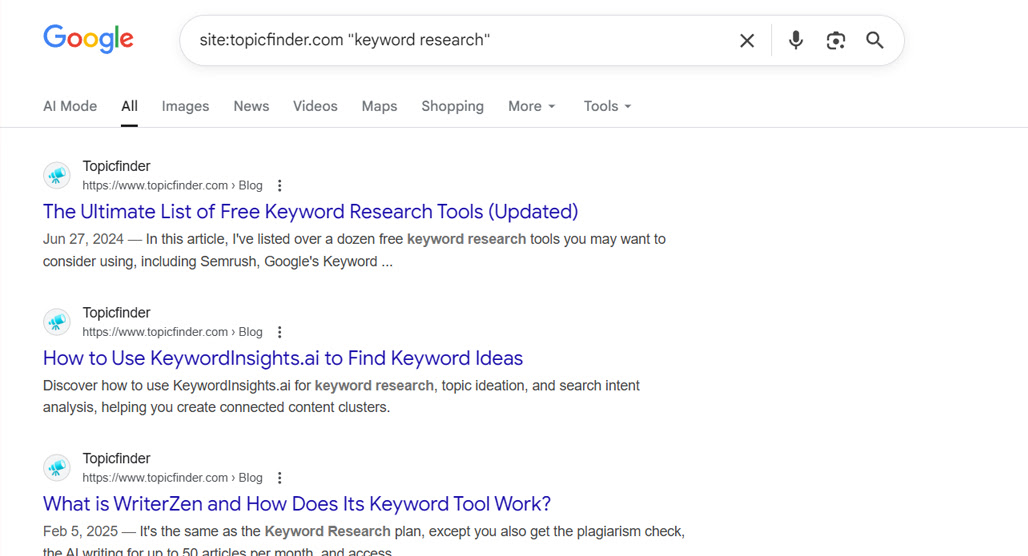
You can also just go to Google and run site searches for your keywords (in quotes) and see what pages come up. This can give you a very basic picture of overlap, though I caution you that you don't get a picture of ranking or disparity in traffic when all you get is your own results.
One thing I would recommend is looking at historic data in instances of potential cannibalization.
If you have a post doing well, and you publish a new piece of content that overlaps with it, but the new content does fine, and the old content continues doing well, there's no real sign of cannibalization happening.
If you have a post doing well, and you publish a new piece of content that overlaps with it, and the old post drops in ranking while the new one grows, that's likely some cannibalization.
You need sufficient historical data to contextualize this, though, which isn't always available. You may also need to check if there's a cause and effect there. I've seen people declare cannibalization when what really happened was an algorithm update tanked content, so they wrote new, better content to replace it, putting the effect before the cause.
Fixing the Cannibalization You Find
So, how do you fix the problem when you think you have cannibalization issues? Fortunately, it's pretty easy, though you have to take each case individually.
First, start by analyzing each instance of overlap and determining whether or not there's legitimate cannibalization happening there. A lot of presumed cannibalization is just similar topics with different intent or format, so they're generally going to be fine.
One thing that might come up here is legitimate duplications. If you have actual duplicate content, that's a whole other problem, and you'll need something like canonical tags to fix it properly.
Once you've narrowed down your list, you have a few potential options.
First, you can redirect one page into the other. Using a 301 redirect to point the less impactful page to the more impactful page will funnel any value from the redirected page to the better one.

This alone isn't a great option, I don't think. Redirects don't pass full SEO value; you lose a lot of value from backlinks and other sources, and if the page is getting traffic or conversions at all, you lose those, too. Even if you think the other page is better, the one you're redirecting might still have some good value.
The second option is to merge the pages. This is mechanically the same as the first option (redirecting the less impactful page to the more impactful one), but you also edit the content of the destination page by adding anything of unique value from the source page, to make a more comprehensive page.
This does still have issues with losing backlinks and value from the redirect, but you can't avoid that with any redirect, so it's the price you have to pay.
Note that with both of these options, I highly recommend not deleting the page you're redirecting away from. Just in case something goes wrong and you want to restore it, it's nice to still have it in place.
The third option, and probably my favorite, is the split and separate method. You have two pages on similar topics that each have some value to them, whether it's ranking, backlinks, or traffic. Getting rid of one of them always feels like a waste. Sometimes the end result is greater than the sum of the parts, but that's not always the case.
So, spruce them both up. But take them in different directions.
Say, for example, I had two posts similar to the one you're reading right now. I could take one and augment the "how to find keyword cannibalization" aspects of it, to make it more of a deeper, detailed guide just on finding cannibalization problems. Then, the other one can augment the "how to fix keyword cannibalization" section, becoming its own guide.
These two can then link back and forth to each other and build each other up instead of stealing from each other. A narrower focus on a more valuable topic helps them grow, and you can even find more elements of the overall subject to cover and build a cluster out of it.
You can do this by adjusting the keyword to a slightly narrower sub-keyword, or by adjusting the search intent, or even adjusting the format of the content, though that's more likely to be a significant change and might not preserve the original value as well.
Just make sure you aren't taking them leaning in different directions where other content exists and could just move the cannibalization issue elsewhere.
Overall, I think keyword cannibalization is generally less of a serious problem than people think, but it definitely happens. It's especially common as you grow a site over time, and find you're cannibalizing posts from years ago that you forgot existed. Fortunately, it's not too bad to find and fix.

Related Posts



Leave a Comment


Fine-tuned for competitive creators
Topicfinder is designed by a content marketing agency that writes hundreds of longform articles every month and competes at the highest level. It’s tailor-built for competitive content teams, marketers, and businesses.
Get Started