How to Cancel Your Semrush Account (Easiest Method)
 Written by James Parsons • Updated April 15, 2026

Look, don't get me wrong. I'm a big fan of what Semrush can do for a business. It might not be my #1 favorite platform out there (that honor probably goes to Ahrefs), but it's still a common entry on my top ten lists.
Sometimes, though, you just don't have the budget to keep using a premium tool and need to dial back on expenses. Maybe you've decided to look into free alternatives to Semrush's features, and it's time to pull the trigger and cancel your Semrush account.
But wait. Where's the cancel link?
Key Takeaways
- Semrush offers five cancellation methods: subscription page, cancellation form, support message, direct email, and phone call.
- The cancellation process includes retention hurdles like training offers, tool showcases, surveys, and a 50% discount offer.
- After submitting cancellation, you must click a confirmation email link within 24 hours or the cancellation is voided.
- Cancellation processing can take up to three business days, potentially causing an unwanted charge if billing renews meanwhile.
- Cancelling only downgrades your account to free; full deletion requires a separate request through Semrush support.
How to Cancel Your Semrush Account
You know it's going to be a bit of a struggle when, rather than just finding a "cancel subscription" button on a subscription management page, you have to jump through hoops. You know it's really going to be a problem when people start making YouTube tutorials on how to do it.
According to Semrush themselves, there are two ways to cancel your subscription. I've also found mentions of a few others, so I'm going to cover all of them, and you can pick the method that works best for you.
Option 1: The Subscription Page
The first option is to follow the link from the subscription information page.
When you are signed into Semrush, you have access to all of the information on your dashboard, of course. One of the main headings is Subscription Info, so click on that. This link brings you to the page where you can see information about your subscription, including things like your next payment date, your number of API units left, your summary, and your payment history. You can also just click here to be taken to your subscription info page, if you're logged in.
At the top, next to your next payment date, you can see the entry "Recurring: Status." If your subscription is active, this will say active.
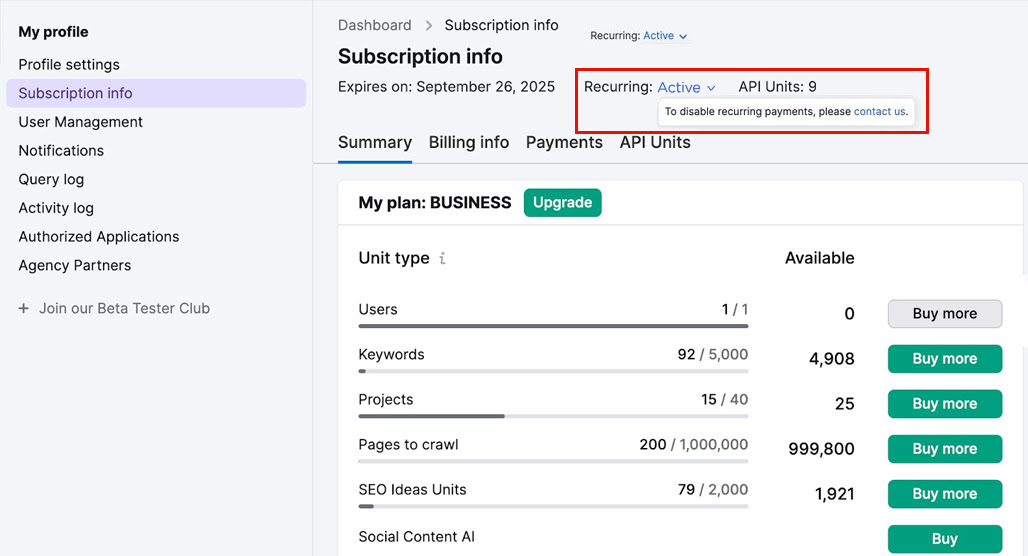
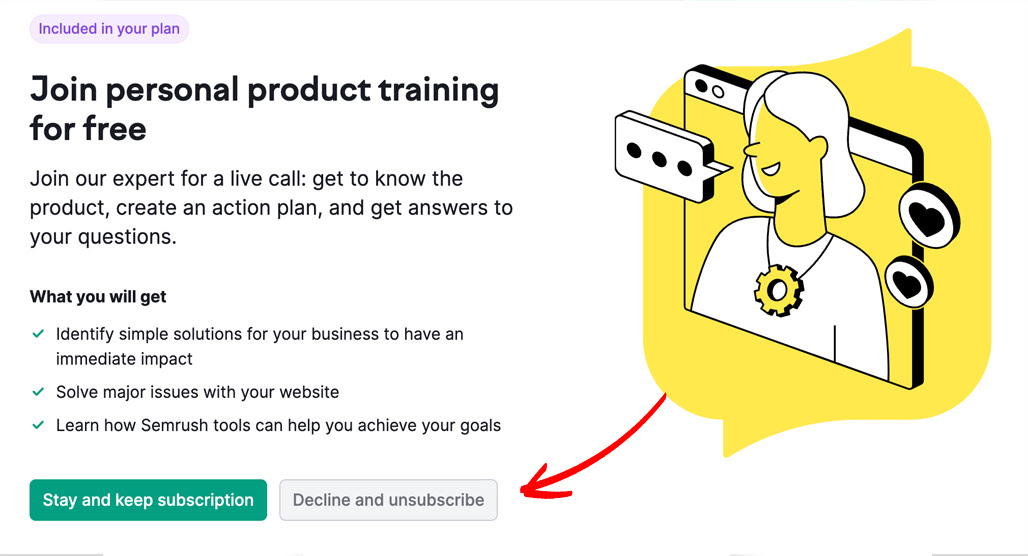
Click this little drop-down, and a little pop-up will show, which asks you to contact them to change your payment status. Clicking this will bring you to their desperate customer retention process, which starts with an invitation to personal product training. Semrush assumes that if you're looking to cancel, it means you're having problems, and they think they can solve those problems by offering you customized training.
Now, sure, maybe that's right. Maybe that will work for some people. I know that, generally speaking, when I'm going to cancel a tool or platform, it's because I've done as much as I can with it and realized it just isn't going to work out. But I'm not necessarily representative of everyone, so hey, if having your issue solved with training will work, by all means, go for it.
One issue their training can't solve, though, is money. No amount of training can get you out of an economic downturn that puts downward pressure on your profits and makes you look for ways to cut costs.
After the training offer, you also have to decline a page full of specialized tools they want you to use. Now, is it a problem with their platform that people might not be aware of these tools until they cancel? Apparently not in their minds. But then, I figure that most marketing tools have a somewhat dated "millions of menus and buried tools" theory of design anyway, so it's all kind of a wash.
Next (yes, we're still not done), they want you to fill out a poll on why you're cancelling.
The question: Why are you leaving? Their options are "can't use it right now", "doesn't fully meet my needs", "not sure if I need it", and "I want to change my subscription". You can bet that this will go directly to a counter in someone's office, where they start to schedule the drip campaign to get you to come back.
Finally, after all of that, you can… accept a discount offer, for 50% off one month. I don't think that's enough to save most subscriptions, but hey, it's good to know it's there if you're ever in a temporary tight spot. Just poke through the cancellation form until you get the offer and claim it. Note: I have no idea if this is repeatable for more discounts later, but if it is, lifehack!
If you aren't claiming the discount, you fill out one more form. You need your name, contact email, and a checkbox that says you're aware that your user data will be deleted after 30 days. Then you can click "cancel subscription" to submit.
You still aren't done.
This is critical: you have to check your email. You have to click the cancel subscription link in this email; otherwise, your cancellation will be cancelled and your subscription will continue.
Worse: this email's link is only valid for 24 hours. If you think you cancelled when you clicked the cancel button (hah, right?) and went on with your day, and don't check your email until the next day, or after a weekend, oops! Time to do it all again!
Better hope you weren't cancelling a day before your next bill, otherwise you're getting billed anyway.
Once you're fully confirmed to have cancelled, log back into your account and go back to the subscription settings page to make sure the status now says "inactive". From this point, you have 30 days to save any data you want to keep; anything that's not available in the free trial, like historic data, projects 2+, or project settings, will be purged.
Option 2: The Cancellation Form
If you want to skip some (but not all) of the hassle above, you can click this link and go to their cancellation page directly.
By "some hassle," here, all I really mean is the part where you go to the subscription page and click the cancellation link on their subscription status message. That link just leads you to the cancel page, https://www.semrush.com/cancel/, which is what I linked above. The retention offers, the poll, and the email confirmation process are all the same.
This link is also the one provided directly on the Semrush legal and refund policy page. There's some interesting data on that page, too.
"Please note that you must be logged into your user account in order for a cancellation request to be received and actioned; failure to do so, or failure to answer all questions in the cancellation request form, may result in the denial of your cancellation request."
In other words, clicking the cancel button, despite being a clear indication that you want to cancel, is not enough for them to actually cancel. Semrush, friends, this is behavior I'd expect out of those shady mail-order record clubs of the '90s, not a modern-day, respected marketing tool.
"Cancellation will take effect at the end of your subscription term or, for unpaid trail or free subscriptions, within 3 business days of receipt of your request, in each case provided that the request was made in accordance with the requirements of this policy. We will confirm the cancellation of your subscription within 3 business days after receipt of your properly submitted, cancellation request."
This one is also pretty important. Since it can take them up to three days to process a cancellation, if your billing renews during that time, you might be billed again. Again, pretty shady! I don't know that they often take a full three days to confirm a cancellation (to my knowledge, it's within a few hours at most), but that variability is there.
Option 3: Sending a Support Message
A third option you can use if you want to bypass all of this hassle is to contact support directly.
If you visit the Semrush support page, you can fill out a form that sends their support team a message. Add your name and your contact email for the account. Under "How can we help you?", choose the drop-down option "I have a question about my account or billing." In the "issue description" box, simply ask to cancel your subscription. You're not obligated to explain why, but it might streamline the process if you tell them that you're not interested in training, offers, tools, or even a discount. There's a good chance they'll still respond with those offers and discounts, though.
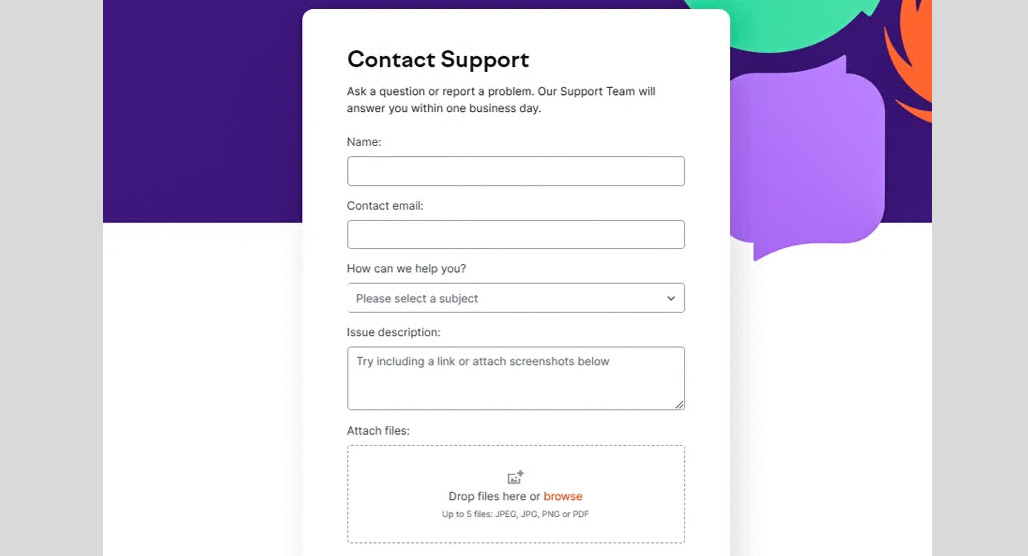
There's also a pretty decent chance that the response you get will just be a link to the cancellation process page, and you'll be right back where you were before.
Option 4: Email Semrush Directly
You can also just send an email directly to Semrush and ask to cancel your account. The relevant email address to contact is just [email protected], but you'll want to make sure the email address you use is the one associated with your Semrush account; otherwise, it might be ignored.
In this contact, add your account email (even if it's the one you're contacting them with, since emails can be spoofed), add in the name you use on the account, the date and amount of your last payment, and the last four digits of the credit card used to pay for your subscription.
If that sounds like a lot of information to just send over email, it is, but that's because it's all for verification. They don't want people to be able to just cancel other people's accounts, after all.

Semrush will probably ask you to share why you want to cancel, and the back-and-forth can add a few days to the whole cancellation process, so make sure to do this well in advance of your next billing cycle.
Note that this isn't a bypass process. Semrush explains this direct email method as a way to cancel an account if you've lost access to it but still need to cancel it. If you're looking for a free alternative to Semrush after cancelling, there are plenty of solid options worth exploring.
Option 5: Give Them a Call
The last option you can try is to call their offices. Semrush has a phone number with active support hours between 8 am and 4 pm on weekdays, GMT. It's an international call, so keep the time difference in mind.

The phone number to use to contact Semrush is 1 (800) 815-9959. You'll go through more or less the same process, asking to cancel and pushing through retention offers before they process it. I haven't used this method, so someone correct me if I'm wrong, but I assume they will also send you the email you need to confirm cancellation.
What If I'm Charged After Cancelling?
A common problem with cancelling Semrush is the delay, which, if it ticks over your billing cycle, can mean you'll be charged for another month (or year) of service during the interim processing time.
This sucks, obviously, but Semrush does have a refund process to handle it. Once you've confirmed that your cancellation has been processed, you'll need to submit a refund request within 7 days of the charge.

Use the contact form here (the same as the support form) to reach out. You'll need to provide the date of cancellation and the date of charge, and they'll process the refund for you.
You generally won't have to worry about contacting your credit card or bank to do a chargeback; Semrush will handle the refund for you, as long as you're proactive about it. Just be sure to check your statements when you're cancelling, and if you're looking for a replacement tool, check out the most affordable Semrush alternatives before you go.
What If I Want to Delete My Account Entirely?
When you cancel your subscription to Semrush, you're not actually getting rid of your account. You're basically just downgrading it to a free account. Some of your data will still be there in case you want to upgrade again later.
What if you want to get rid of your account entirely? Whether you're cleaning up the detritus of digital living, you're closing everything associated with a failed business, or you just don't like accounts lingering around, you can delete a free account (including a downgraded account) using the same support link.

In this case, you'll want to ask about de-registration and account deletion. They will send you another email to fully confirm that you want a deleted account. The deletion link is available for 72 hours, and once confirmed, will initiate the full account deletion process. They'll process and delete your account within 30 days.
So, there you have it. I gotta say, I really don't like when services make cancelling such a big and annoying hassle. It should be self-service.
Unfortunately, since click-to-cancel laws got shut down, we're stuck with it for now. At least Semrush is legitimate; there are plenty of other scummy businesses that won't cancel at all until you do a chargeback and halt payments from the bank side.

Related Posts


Leave a Comment


Fine-tuned for competitive creators
Topicfinder is designed by a content marketing agency that writes hundreds of longform articles every month and competes at the highest level. It’s tailor-built for competitive content teams, marketers, and businesses.
Get Started