How to Use AlsoAsked for Your SEO Keyword Research
 Written by James Parsons • Updated April 15, 2026

Google gives you a lot of information, and I don't just mean when you're running a search and looking for what websites or AI summaries pop up. As marketers, we want to rank well in Google's search results, which means knowing what Google ranks, how they rank it, and why it works.
There are a wealth of Google resources for finding this information. From Google Analytics and the Google Search Console to tools like the Google Keyword Planner, you can get a lot from what they give you.
You can also get a lot more from what they do to help users find what they need. One of the most common resources is using Google's autocomplete and scraping that information.
Beyond that, though, you can also pull information from other infoboxes and resources Google has created to help users find more information. One of the big ones is the PAA box: People Also Ask.
I've been reviewing a lot of different keyword research tools recently, and today's post is no different. Today, I'm looking at AlsoAsked, a keyword research tool designed specifically to pull information from the People Also Ask box, which you can then use for both basic keyword data and keyword clustering ideas.
How does it work and how can you use it effectively? Is it worth using? I'll get to all of that, but first I need to talk about the PAA box itself.
Key Takeaways
- AlsoAsked scrapes Google's People Also Ask box, mapping questions two to four tiers deep from a single seed keyword.
- PAA box answers are now AI-generated by Gemini, making the data less authoritative than real user discussions it previously pulled from.
- AlsoAsked stays more on-topic than manually clicking PAA results, which can drift far from your original query.
- CSV exports on paid plans make filtering, clustering, and bulk processing PAA questions significantly easier than parsing raw search results.
- Effective use requires filtering duplicate, off-topic, or irrelevant questions, then clustering remaining questions into grouped content topics.
People Also Ask, AI, and the Evolution of Resources
As you've likely noticed over the last few years, Google has been doing a lot to change how its search results work, driven largely by AI.
The most obvious change is the AI Overview, their guided summary of information pulled from some of the top search results. They use scraped and summarized information from websites, videos on YouTube, and other resources to synthesize answers to nearly any query they can.
But that's not the only place where Google has started using AI. That's right: they're using it in the People Also Ask box now.
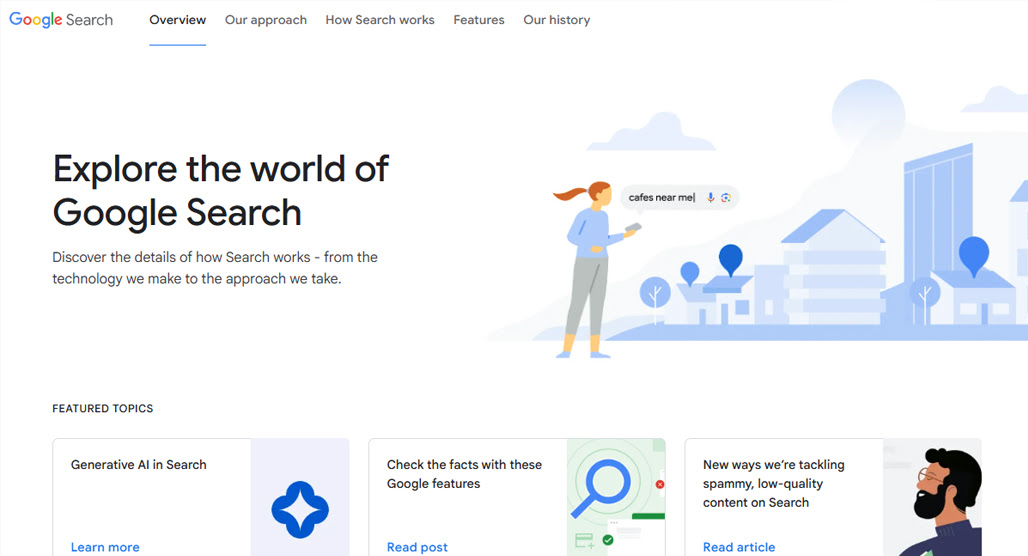
So, what is the People Also Ask box, what purpose does it serve, and how does it work?
First, a distinction: did you know that, today, there are at least three different kinds of boxes in this vein?
One of them appears on nearly every search, down at the bottom of the page. It's the "People Also Search For" box, and while it's similar to the People Also Ask box, it's not the same thing.
PASF shows you raw keyword queries related to the query you put in, sort of like a selection of the Google Autocomplete suggestions. For example, for the query "keyword research", the PASF box includes options like "keyword research tool" and "free keyword research tool"; extensions, longer-tail versions of the base keyword, to give you options to refine your query.
PAA is a little different. Instead of keywords, it shows questions, ostensibly questions that real users have asked. Those questions are (or used to be, more on this in a bit) pulled from discussions, like on Reddit, from the titles of videos, or from Q&A-style blog content. For "keyword research," you get PAA results like "Can I do keyword research for free?" and "What is keyword research?"
Note that PASF is keywords, while PAA is questions. The difference is small, but the purpose and use can be very impactful.
The third version is something relatively new to Google: the "Things to Know" box. This is something they introduced just a couple of years ago, and serves as a sort of guided exploration of your topic. For "keyword research", it pops up categories like "Mistakes", "Benefits", "PPC", "Keyword Types", and "Measurement". Each of these has the category, a question related to it, and a drop-down with more information.
Functionally, the TTK and PAA boxes serve very similar purposes. They're more plain-language explorations of a topic, guiding users through additional discussions without making them think of the questions themselves.
PASF, meanwhile, is just links to additional Google search results. It's still useful data, but not in the same way.
How AI has Changed What People Also Ask
There are a couple of caveats and omissions in the above, which I need to talk about here before we go much deeper.
In the past, boxes like the People Also Ask box were pulled from real user discussions. The results they gave you, when you opened it, were a snippet from a page and a link to the discussion it came from. It was often a way to find specific Reddit pages or pages on support forums like the Microsoft or Google discussion boards.
Now, if you want results from discussion forums, you need to find the "Discussions and Forums" box or use a search modifier. The PAA box, as well as the TTK box, are entirely AI-generated now.

If you do a Google search now, first of all, there's a decent chance that you won't even see the People Also Ask box. If you do, when you click the drop-down to see the answer, you see another Google AI Overview. The AI Overview is functionally identical to what would be generated at the top of the page if you typed the question into the search box.
I say "functionally identical" by the way because those AI overviews are effectively unique. You can run the same query five times and get five similar but unique answers… sometimes even with different information.
The same goes for the Things to Know box; it's just prompts for the AI Overview to generate more focused AI summaries.
One quirk of how the People Also Ask box works, as well, is that when you open one question, Google will generate three more related to that question and append them to the end of the PAA box. You can effectively dig as deep as you want into tertiary topics until you're looking at something completely different.
To demonstrate, here's a chain I followed by clicking the PAA questions:
- Initial query is "building a business"
- "Is $20,000 enough to start a business?"
- "What is the $27.39 rule?"
- "Is $400,000 enough to retire at 62?"
- "What do most retired people do all day?"
- "What is the biggest retirement regret among seniors?"
- "Who are the happiest people in retirement?"
- "What is the average lifespan of a retiree?"
- "What occupation lives the longest?"
- "What job is hardest on your body?"
- "What jobs suit ADHD brains?"
- "Do ADHD men struggle with intimacy?"
From building a business to ADHD relationship advice in a dozen clicks. If you're writing a blog about building businesses, I don't think ADHD relationship advice is going to be a useful topic of discussion.
Interestingly, for this chain, every one of these generated an AI overview except #6, #7 and #8, which were more traditional PAA links (to a Facebook post, a Fidelity page, and a TIAA page, respectively). Why? I have no idea.
Why Does Any of This Matter?
Why am I going on this tangent on a blog post supposedly about reviewing a tool?
Mostly, I want to point out how much of what Google provides now is all AI-generated. There are two main reasons I wanted to draw attention to this.

The first is that we're talking about a tool that specifically scrapes information from Google's People Also Ask box. If that information is just AI-generated, though, is it really any good? After all, if it's no longer actual information that real people asked, is it worth targeting as keyword information?
I would argue yes, solely as a self-reinforcing cycle. See, the trick with using the PAA box for keyword research is that you don't care as much about the fact that people ask it, so much as the fact that Google claims people ask it. Your goal isn't necessarily to answer questions; it's to answer Google's questions.
Yes, I know Google has held the mantra of "create content for people, not for search engines" for literal decades now. But the moment they started replacing actual people's actual content with AI content, they made that mantra a lie. In many ways, you are now creating for the search engine. Or, more specifically, you're creating for the LLM that underlies the search engine.
The second reason I bring this all up is that Google's AI Overviews are powered pretty explicitly by Gemini. That means you can get basically all of the same information using a few structured prompts from Gemini directly, instead of laundering it through a tool and the search results page.
That said, AlsoAsked (yes, I'm still getting there) has some benefits which make it worth using despite everything I've said making it seem like it's no longer relevant. For instance, if you're trying to find zero-click keywords worth targeting, understanding what questions Google surfaces in the PAA box can still be a valuable part of your research process.
What is AlsoAsked?
AlsoAsked is a tool you can use for keyword research. You type in a query, and it runs a search. They scrape the PAA box, and then for each answer to that question, they scrape the PAA box for that question too. One query gives you around 4-5 questions, and each of them gives you 5-10 additional questions.
Note that AlsoAsked is laser-focused on just the PAA box. The TTK and PASF boxes are not part of what AlsoAsked scrapes, so that's data you have to get somewhere else, if you want it.

It's more than just going to Google and clicking around, though.
For one thing, you have filtering and targeting. AlsoAsked lets you choose the country, city, and language of the query, which will affect the questions being asked.
You can use it for free, but it's limited; you get four searches per 24-hour period, and it can take several minutes to run each search.
You can, however, pay for a plan and get more out of the tool when you do.
The basic plan gives you 100 credits per month. One search is one credit. You have access to unlimited user accounts, all geographic regions, and all languages with this plan. They save your search history for 24 hours so you can revisit searches, and you can export the data as a PNG image. It costs $15 per month.
The lite plan gives you 300 credits per month. It also gives you Deep Search, which goes four tiers deep into the Q&A flow instead of just two. However, the deep search costs 4 credits per search instead of just one. You get more answers per credit using deep search than you would running four individual searches, though, so it works out in your favor. Additionally, you get CSV data outputs, which are much easier to work with than PNGs. It also saves your search history for a full month instead of just a day. This costs $30 per month.
Finally, the pro plan gives you 1,000 credits per month. It bumps up saved search history to a full year, though bear in mind that data can fall out of date over time, so it can be useful to re-run searches periodically. This plan also lets you upload your own CSV and run bulk searches, and gives you API access for faster use or for building your own dashboard. If you need more than the 1,000 credits they give you, as well, you can buy pay-as-you-go credits at this tier. All of this is $60 per month (plus any extra credits if you buy them.)
All plans are 20% cheaper if you pay annually, as you might expect.
Is AlsoAsked Worth Using?
I started this post with a diatribe about the infusion of AI into Google search, particularly as to how it relates to the People Also Ask box. So, if the PAA box is basically just Gemini output, why use and pay for AlsoAsked when you can just use Gemini?
A few reasons.
One is the data exports. Being able to nicely harvest all of this information in a CSV is way better than trying to parse and extract data from Gemini output. It's also much better for bulk searching than repeated LLM prompts.
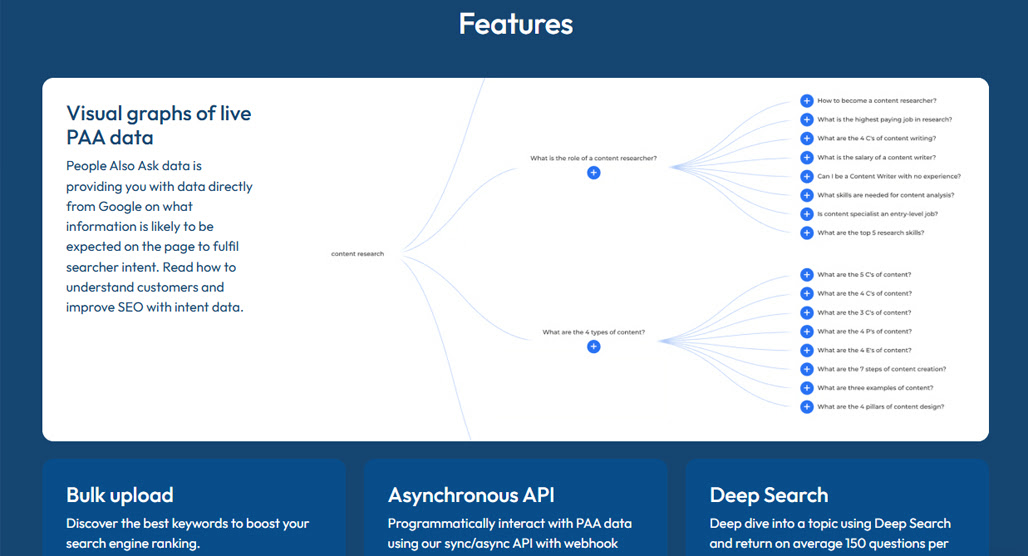
The second reason is that, as mentioned in my example above, not every question and answer in the PAA box is AI. Some of them are still the old-style questions pulled from real sites, which is something Gemini output would miss.
Third, and most importantly: to my eye, AlsoAsked is better at staying on target.
For example, I put in the "building a business" keyword to start, and it generated some basic, good questions. Drilling down to "Is 20k good to start a business," and the suggested results are all potentially useful:
- Is $20,000 enough to start a business?
- What businesses can start with $20,000?
- How much will $20,000 grow in 20 years?
- What is the smartest thing to do with $20,000?
Each of these drills down into more specific questions.
Now, certainly, this isn't a great example for building a business, because it focuses on the number rather than the concept. But that's a flaw in my usage, not in the way the platform works. Critically, though, none of it veers off into retirement, odd financial rules, or ADHD relationship advice.
So, overall, I say that AlsoAsked is solidly worth using. I'd go for the Lite plan for the CSV exports in particular, but the choice is yours. If you want to dig deeper into what makes a good seed keyword for this kind of research, that's worth reading before you dive in.
How to Use AlsoAsked for Keyword Research
So, how do you actually convert AlsoAsked into valuable keyword research?
Well, using the tool is super easy; just start with a seed keyword and let it run. It will harvest a bunch of PAA box questions (and, note, even if your organic results don't even show the box, the tool will still work; it's still there, Google just isn't showing it to you) and map the flow.
The simplest use is to then take those questions and use them to write content. If you just run down the list, though, you'll end up with duplicate coverage and some off-base questions.
So, your second step is to filter the results. This is where the CSV export really shines, and where doing the deep search helps in terms of volume.
Go through and:
- Prune out duplicate questions or questions that are too similar to one another.
- Prune out questions that are off-topic for your website (like a discussion of compound interest or retirement for a business-building blog).
- Prune out questions that your audience realistically wouldn't be asking or interested in.
Once you've done this filtering, you'll likely still be left with a dozen or so questions for each base keyword you use. Deep search leaves you with more, basic search with less.

Next, you can go through and repeat the process with further questions, keywords, and discussion topics. Core keyword research from other resources, or even just using keywords from your Google Search Console, gives you a great place to start.
Using this process, you can build a huge list of actual questions (or close enough to actual questions) that cover topics your site should answer.
Next up, you should do some content clustering. You can group up related questions just based on the flow they were generated with, or you can use keyword clustering tools, or both. The goal is to create groups of related questions.
Now all you have to do is create content. You can write individual larger discussion posts about each question, or you can create FAQ-style pages answering several of them at once; both are valid strategies, and it depends on how closely related the questions are.
Overall, for the price, I would say AlsoAsked is a very effective way to scrape this one particular kind of Google data, and that Google data is still fairly useful. Unfortunately, the AI summary answers make it less valuable than it used to be (since you aren't getting placement in the PAA box itself anymore), but it's still great for inspiration.

Related Posts


Leave a Comment


Fine-tuned for competitive creators
Topicfinder is designed by a content marketing agency that writes hundreds of longform articles every month and competes at the highest level. It’s tailor-built for competitive content teams, marketers, and businesses.
Get Started