How to Use TrendFeed to Find Blog Post Ideas
 Written by James Parsons • Updated April 15, 2026


When you're looking for new topic ideas to write for your blog, you have a few different options available to you.
Sometimes, the best option is to do a lot of digging. Analyze some group of your audience, figure out their sentiment and their buyer intent, identify the keywords that resonate the most with that paradigm, find topics that cover those keywords, and spin up a plan to develop a content cluster around it.
Other times, you don't want to do quite so much work.
Fortunately, there are valid and valuable methods for finding topics that are much lower-hanging and easier to both identify and write.
One of my favorites is trend jacking. Public interest is like the sea; it comes and goes, influenced by factors beyond our control, but if you know the way the wind is blowing, you can ride it to your destination.
There are a thousand tools out there to help you accomplish this. I've even written about a few before, like Glimpse Trends, Exploding Topics, and LowFruits.
Today, I wanted to take a look at another tool you might consider for trend chasing: TrendFeed.
Key Takeaways
- TrendFeed, made by TrendSpottr, is a curated news feed showing industry-relevant trending content rated Elevated, High, or Extreme.
- Data refreshes hourly, so acting within one to two days of a trend surging is critical to avoid heavy competition.
- Using TrendFeed through Semrush costs $25 monthly versus $50 standalone, and integrates with Semrush's broader research tools.
- The author considers LowFruits and Exploding Topics more valuable overall, but recommends trying TrendFeed's free trial first.
- AI-generated trend content risks being unreliable or hallucinatory since LLMs lack real-time knowledge of newly emerging topics.
What is TrendFeed?
Before digging in, I need to define what, specifically, I'm talking about. That's because there are half a dozen different companies and brands using the name.
So, no, I'm not talking about the UK-based marketing company, or the Netherlands-based marketing company, or the TikTok AI class, or the clickbait YouTube channel.
No, what I'm talking about is the product from TrendSpottr, the app called TrendFeed, which can be accessed on its own or via API from other platforms, including Semrush.
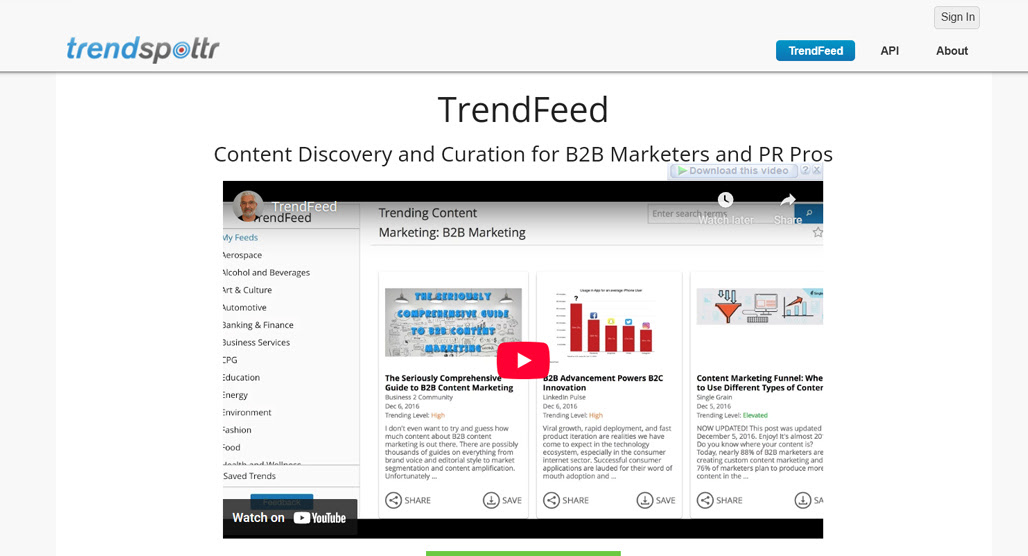
In concept, TrendFeed is pretty simple. It's basically just a news feed, with stories from major and industry-relevant news outlets presented to you in a single dashboard. Unlike just looking at Google News or a curated Facebook feed, though, the algorithm surfacing and presenting information to you is different.
Other algorithms show you content designed to get you interested in ads or keep you around on their brands. TrendFeed shows you content aligned with your industry needs.
Each piece of content you're shown is rated. You get the title, author or outlet, date, and description of the piece, but you also get an analysis of the "trending level" of the topic.
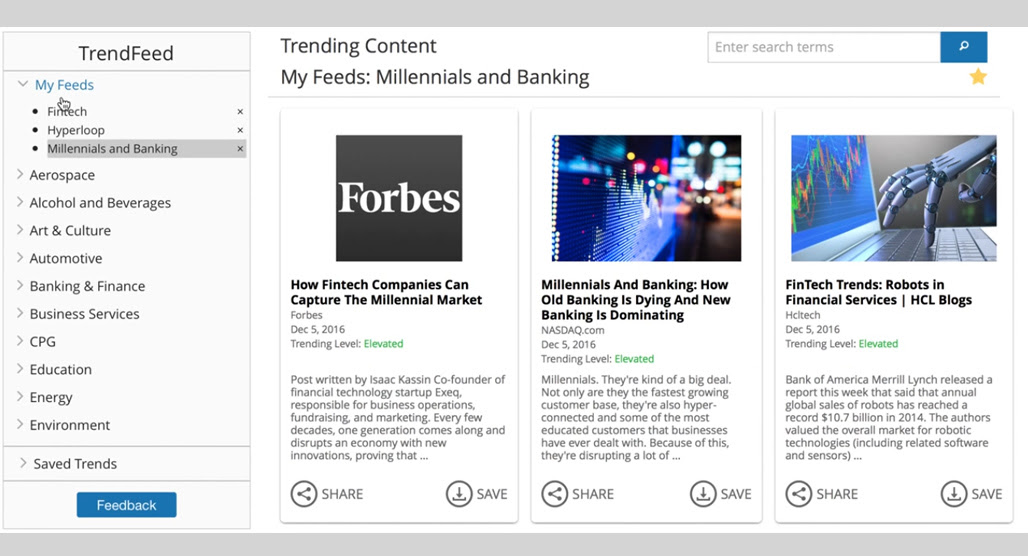
This analysis isn't as simple as just watching how often the story is shared, or anything basic like that. TrendFeed's analysis looks at big data about the topic beneath the post, and if there are a bunch of posts popping up about the same topic, it can show as a higher trending level.
Trending levels can be Elevated, High, or Extreme. The higher the trending level, the more full-swing the trend is, and the potentially more valuable it can be. At the same time, the higher the trending level, the more competition you have, since you're a little late to the party. This data refreshes once per hour.
You're able to save posts for later reference, and can favorite specific feeds to see what's in them whenever you revisit the app. You can also directly share posts to your social feeds if you set up the link.
TrendFeed also has an LLM-integrated "write me a post" feature if you want to have rapid responses on your social media feeds. It's really basic, though. You choose a stance between supportive or contrarian, it generates a hundred or so words, and you can shuffle, edit, or use it. Personally, I wouldn't make much use of the feature, but I also don't do a ton of social media marketing these days.
When you get TrendFeed directly from TrendSpottr, it'll run you $50 per month. If you get it as an app through Semrush, it's only $25 per month, but of course, you have to have your own paid account with Semrush for that.
So, how can you use TrendFeed to find ideas for blog posts?
Using TrendFeed to Find Blog Post Ideas
The good news is, it's pretty easy to use this app for blog post ideas and topic ideation. The bad news is, you do still have to do a lot of intentional thinking about it all.
Step 1: Set Up Your Feeds
The first thing you need to do is set up your feeds. TrendFeed covers around 200 different topics, which can be things like "travel tech," "Canadian finance," or "film and TV". The overall topics are sorted into 30 overall categories, like software, aerospace, and education. If you've ever looked at category lists before, it's a familiar list.
You can also use the search bar to search for a keyword that might not be one of the pre-configured feeds. It works best with short-tail keywords, since your overall goal is more of a bird's-eye view of your topics rather than a narrow, long-tail review.
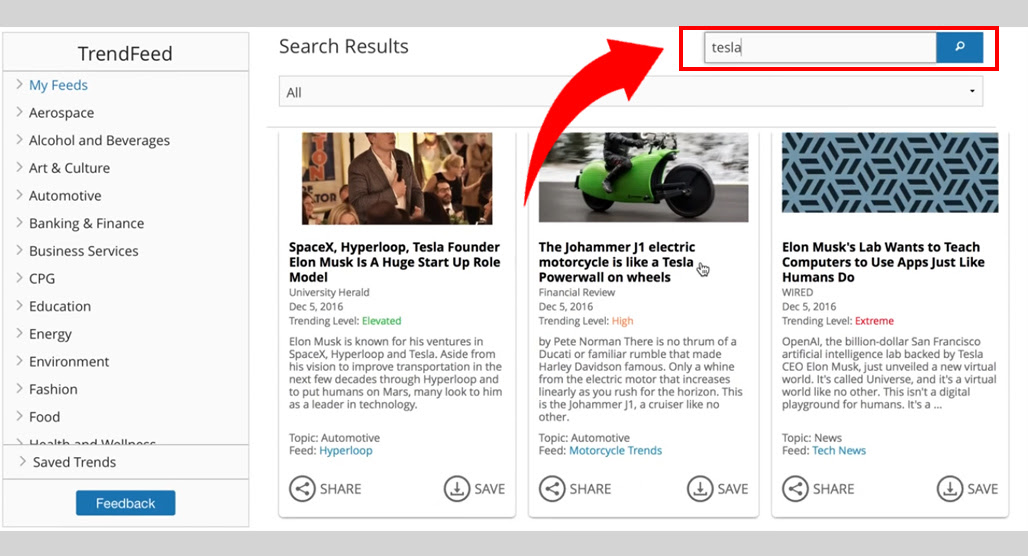
You can favorite and save specific feeds and save individual trends to watch, and you can sort the search results by feed as well. All of this lets you refine and save the results so they're easy to go back to each time you need to check for new trends.
Step 2: Save Promising Trends and Explore Further
The main loop of using TrendFeed is to search your topics and explore your feeds, find trends that might be interesting, and then research them further to see if they're something you can take advantage of with a full blog post.
So, as you browse your feeds, save anything that looks like it might be relevant to discuss.
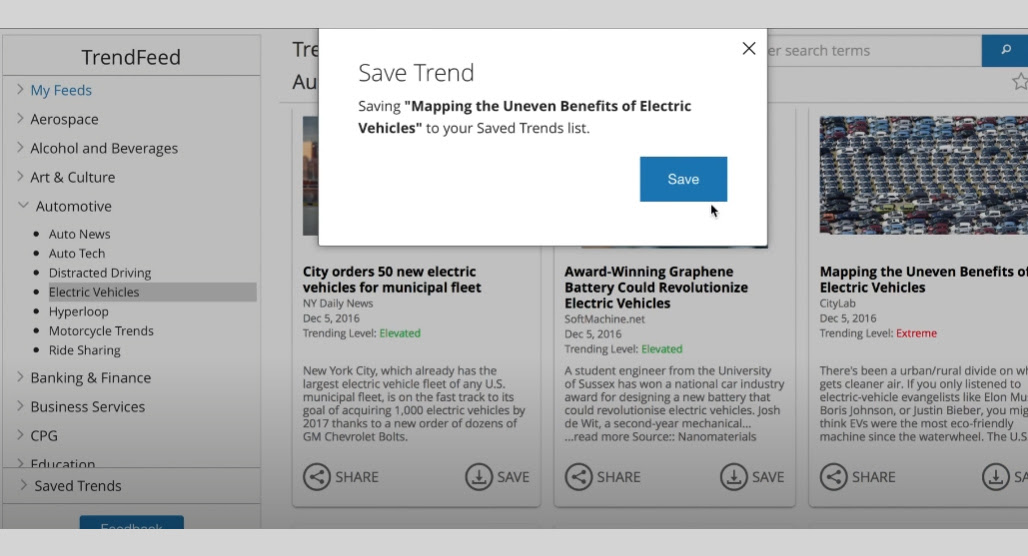
Pay special attention to the weight that is given to each post. These trending levels give you an idea of how rapidly the trend is escalating, and the higher the priority, the faster you need to be if you want to get in on the ground floor for the trend.
While TrendFeed doesn't tell you exactly how they calculate these trend weights, they do throw some buzzwords out.
"We use a CEP (complex event processing) approach to identifying trend levels. Our approach includes: stream aggregation, data enrichment, predictive algorithm, pattern recognition and matching, filtering, correlation, and anomaly detection."
Helpful, right?
It really just comes down to watching traffic through various sources and identifying when something is spiking outside of the norm for content produced by that page or about that topic.
Unfortunately, TrendFeed itself doesn't offer a lot in the way of additional exploration for a trend. You can click through and read the initial post, but there's not much way to explore the trend itself and see what kind of coverage is popping up where, at least not within the app itself.
This is where using Semrush gives you an advantage. Since Semrush has a million different tools and apps to help you with your marketing, you can leverage a bunch of them to give you deeper insight into the trends you identify using TrendFeed. If you're curious about the reliability of its data, it's worth reading up on how accurate Semrush traffic estimates really are.
If you aren't using Semrush and have chosen to use TrendFeed on its own, you have other ways to explore the trend. Something as simple as searching for the trend on Google, X, Bluesky, and other feeds can give you a great impression. You can also go digging through other feeds and analysis apps, like the ones I mentioned above (Exploding Topics and how to use it properly), or use your standard topic research tools.
Step 3: Jack the Trends
The key to all of this is a rapid content production cycle.
In a lot of cases, if a trend is surging, you only have a few days to get in on it before you'll end up drowned out. Many, many people are capitalizing on trends, which is why finding those trends early is a key part of using them for your own marketing. You get a lot more attention if you're one of a hundred posts on the subject than if you're one of a hundred thousand posts on it.
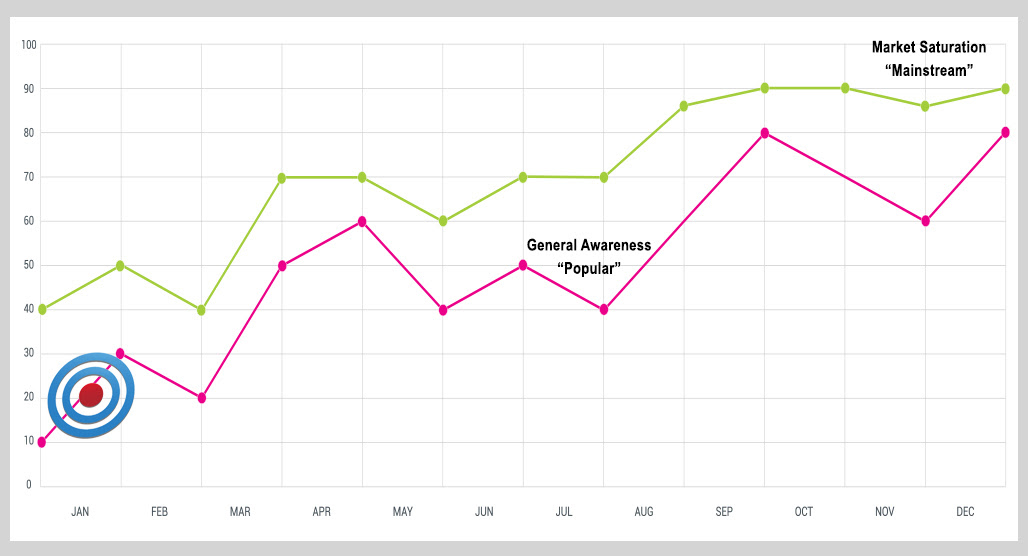
If you're going to chase trends, you need a firm, fast production pipeline. You need to:
- Decide what your perspective is on the subject.
- Do any research necessary to justify or back up your perspective.
- Come up with an overall topic and focal point for your commentary on the subject.
- Write your content as quickly as you can.
- Do your usual images, SEO details, and other optimizations.
- Publish and promote.
Your goal is to have this up within a day or two of the trend starting to surge, so that when more and more people get in on the trend, you're one of the authoritative posts they find. You might have commentary supporting it, or running in opposition to it, or presenting a third option; it doesn't hugely matter which perspective you take, as long as you have something to contribute.
Because of the time-consuming nature of creating content, a lot of people are turning to AI generation for this. I would caution you against this, though. Sure, it's fast, but there's one huge drawback.
LLMs are trained on text, and to the extent that they "know" anything (which they really don't), they can only know things they were trained on. Trends are, by definition, new and surging information. While some LLMs are able to do live searches and incorporate that information, there's only so much they can do to synthesize it with existing training. Understanding how rising trends work for SEO can help you make smarter decisions about when and how to act on them.
What I'm saying, basically, is that LLM output for trend chasing has a much higher chance of being unreliable, hallucinatory, or off-base. You could use it to give you a framework for a post, but fill in the details yourself.
I also think people are growing more and more attuned to the presence of AI content in trends, and are more prone to avoiding it when they think something doesn't pass the sniff test. The authenticity is important, especially in a topic that will rapidly fill with noise. It's also worth making sure you validate your content topics before you write rather than just reacting on impulse.
Should You Use TrendFeed for Blog Post Ideas?
This is a tricky question to answer.
Out of all of the trend-chasing apps I've looked into, I don't think TrendFeed is among the best. LowFruits and Exploding Topics, in particular, are more valuable to me in my experience.
On the other hand, if you run TrendFeed from within Semrush for half the price it normally is, it's a lot easier to work it into your workflow than if you're using separate, stand-alone tools. That convenience shouldn't be underestimated; I've had a lot of good tools go underutilized just because it's a slight hassle to tab between them.
Personally, I think it's worth giving it a look through the free trial and seeing if it gives you enough useful information to spin up content for your industry. If it does, great! If not, there are plenty of other options to explore instead, so you probably don't need to spend the $25 or $50 for it.

Related Posts



Leave a Comment


Fine-tuned for competitive creators
Topicfinder is designed by a content marketing agency that writes hundreds of longform articles every month and competes at the highest level. It’s tailor-built for competitive content teams, marketers, and businesses.
Get Started