What is Keyword Mapping? Strategy, Generators and More
 Written by James Parsons • Updated April 22, 2026

It's no secret that SEO and marketing center around keywords. It's really just how language works; when you talk about something, you're talking about a topic, and there's a keyword phrase that sums up the conversation.
Codifying and putting those keywords on paper is a powerful way to make sure your marketing is aligned with your goals, with audience expectations, and with what search engines and AI look for. That's the core concept behind keyword mapping.
Key Takeaways
- Keyword mapping assigns primary keywords to every page, helping organize site structure and align content with audience and search engine expectations.
- Without keyword mapping, sites risk disjointed content, topic coverage gaps, and keyword cannibalization from targeting the same keyword multiple times.
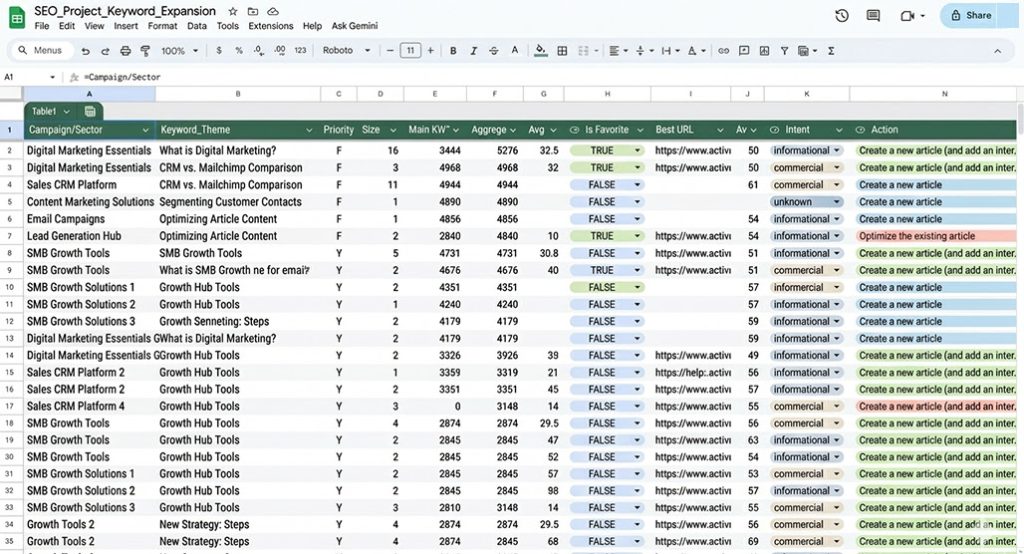
- Effective keyword maps include primary and secondary keywords, search intent, URL, page type, and optional performance notes or gaps for future content.
- Key tools include website scrapers, keyword research tools, keyword extraction tools, and clustering tools - though a basic spreadsheet works too.
- Building a keyword map involves listing pages, identifying keywords and intent, clustering content, and regularly maintaining the map as content evolves.
Table of Contents
What is Keyword Mapping?
Keyword mapping is the process of identifying the core keywords for each page on your website. Every existing URL should have a primary keyword phrase mapped to it, and every keyword you want to target can then have a URL made for it.
There's a decent chance that you're already doing some of this as part of your keyword research, but if you haven't been, you can run into a lot of problems. Keyword conflicts, disjointed content, and a lack of logical flow to your site are all issues you'll run into.
When I explain keyword mapping to clients, some of them nod along; it's something they already know. Others have an epiphany and immediately see a jump in rankings as they reorganize and improve their topic coverage.
When is Keyword Mapping a Good Idea?
Keyword mapping is a very useful project in general, but there are a few specific situations where it stands out.
First is when you're starting to run out of ideas, and you aren't sure where to go next with your content marketing. A Keyword map helps you figure out what you've covered, what you haven't, and most importantly, what is performing well, so you can replicate that success in future content.
Another good opportunity to create a keyword map is when you're doing a site redesign, revamp, migration, or audit. If you're already making big changes to your site, performing a content audit and building a keyword map helps you retool the site into something more effective.
I almost always build a keyword map as one of the first things I do when I pick up a new client. If you're a B2B company providing content services, having a keyword map gives you a great foundation to see what has been done and what still needs to be covered - which pairs well with building out a full content roadmap.
What Happens if You Don't Use Keyword Mapping?
If you don't use keyword mapping, you end up with a disorganized website and a poor grasp of what you have and haven't already covered.
Your content can end up disjointed, with no clear connections between related content. When you do keyword research, put your keywords in a pool, and write them without a plan, you'll end up with content that doesn't relate to other content on your site. You may not have a good awareness of what you've already covered, and you'll have a harder time building internal links and references.
This is one of the biggest problems I see with client sites. It's not enough to just file away your blog posts in a few broad categories. You need to build clusters based on keyword mapping if you want to succeed.
Your topic coverage can be left with large gaps where good keywords could be targeted. Part of the purpose of building a keyword map is understanding the breadth and depth of your topic coverage. You can use it to build content clusters and compare your site to industry coverage and user interests.
When I'm auditing client sites, keyword mapping helps me uncover gaps in coverage that are often surprising. Many business owners lose track of what they've covered and forget that some large, obvious topics just haven't been discussed. It's an easy opportunity for new content that ranks.
You can easily accidentally cover the same topic multiple times, and cannibalize your SEO. When you don't have adequate awareness of what you've already covered, it's very easy to accidentally cover the same topic again and again. Google is never going to give you 2+ spaces in the SERPs, so having 2+ blog posts about the same topic means you're competing with yourself.
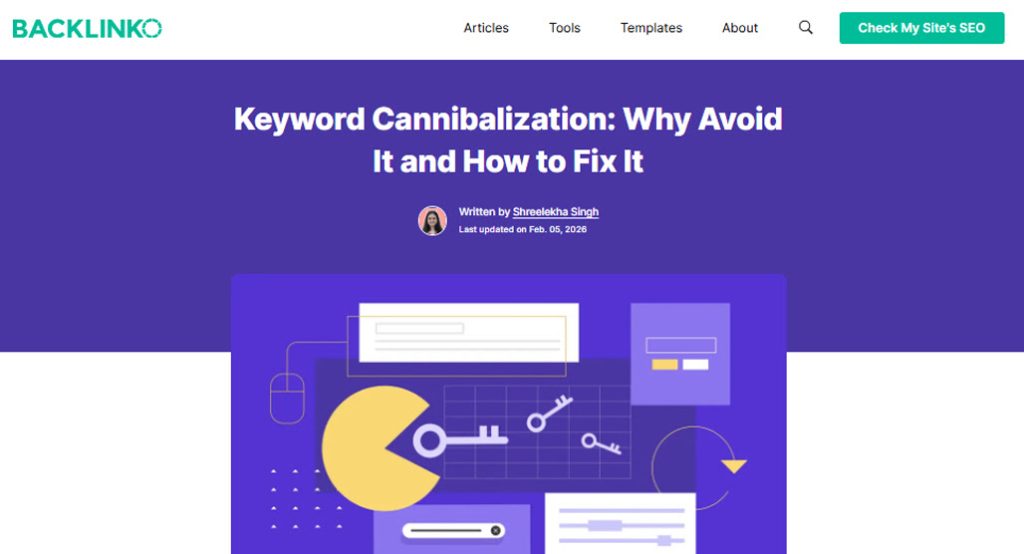
There's a detail here I often have to discuss, though. It's not just about covering the same keyword multiple times. You also have to consider the user's search intent and the post's goal. It's only when all of those align that the content risks self-competition. You can actually cover one topic multiple times if you do it properly, and keyword mapping is a huge tool to help you do so successfully.
What Are the Benefits of Keyword Mapping?
Keyword mapping is all about organization, consistency, and thoroughness.
Some of the most notable benefits of keyword mapping include:
- It helps you build effective content clusters.
- It helps you ensure robust topic coverage.
- It helps you prevent keyword cannibalization.
- It helps you improve site structure and logical flow.
- It helps you find internal link opportunities.
- It helps you refine your search intent targeting.
- It helps you optimize content planning.
There are ways to do all of this individually, but keyword mapping facilitates all of it. It's sort of like the lubrication that smooths out all of the other tasks you want to complete in building a content marketing plan.
What Information Do You Need for Keyword Mapping?
Many people think that keyword mapping is just a one-to-one association of keyword and URL. While that's the start, effective keyword mapping goes beyond just that.
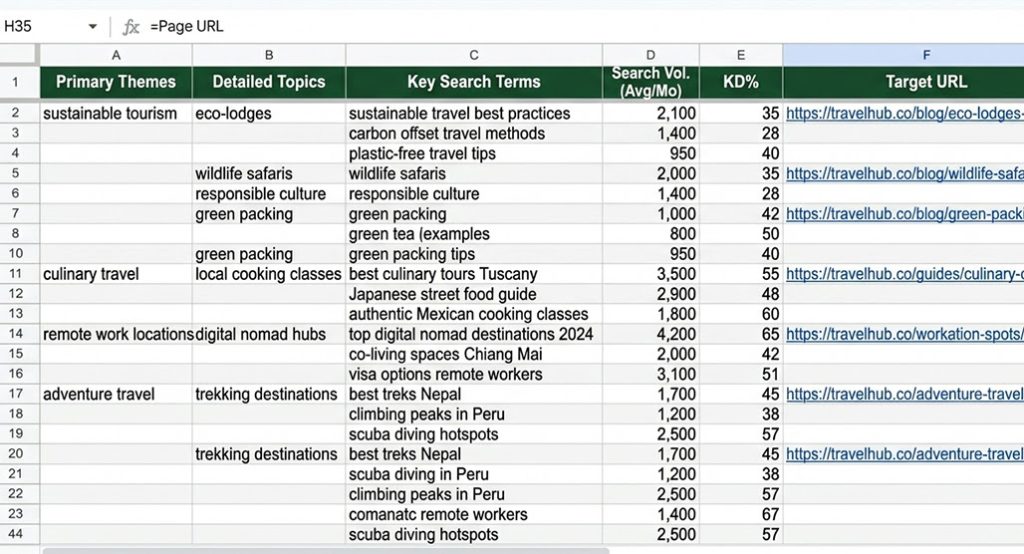
The topic keyword cluster. This is the primary keyword of the page, but also the secondary and long-tail keywords the page targets as well. These secondary and long-tail keywords are what define the search intent and focus of the content beyond just the overall topic.
The search intent the page is targeting. There are five kinds of search intent (the reasons users are searching for the keyword or topic). You can usually write content using the same topic for at least three of those search intents.
- Navigational Intent, which is when a user is searching for a keyword to go to that keyword's page. Usually, this is a brand name or URL name.
- Informational Intent, which is when a user wants to learn about a topic. Google rich results and AI overviews dominate these kinds of searches, so your pages format information for those venues now.
- Tutorial Intent, which is when a user wants to learn how to do something. Instructions, tutorials, recipes, and other pages fall into this category. It's also known as DIY intent because the user wants to DIY, not buy.
- Commercial Intent, which is when a user wants to research something they're considering buying. These are often comparison and review posts, and can be the best kinds of intents to target with content marketing.
- Transactional Intent, which is when a user knows they want to buy something and is looking for the best place to buy from. This is the best intent for landing pages and product pages.
One primary keyword can be targeted with several kinds of intent, usually ranging from informational to commercial across blog posts, and transactional with landing pages and product pages. Keyword Mapping allows you to keep track of all of this.
The URL of the page. You're mapping all of the keyword information to specific pages on your site, so you need the URL to be one of the key pieces of data in your mapping spreadsheet.
A summary of the page's topic. This isn't strictly necessary, but can be very helpful. Just write a plain-language summary of the topic and purpose of the post. It can be as simple as "an informational blog post about keyword mapping meant to build authority and a hub for a content cluster."
Information on the type of page. A keyword map is not just for your blog; it's for your whole website. That means you'll want to include whether the page is a blog post, a landing page, a product page, or some other kind of page.
Other optional data. Some people like to include keyword research metrics in their keyword mapping, such as keyword difficulty, competition, and the nearest competitors for the specific keyword and intent pairing you're targeting.
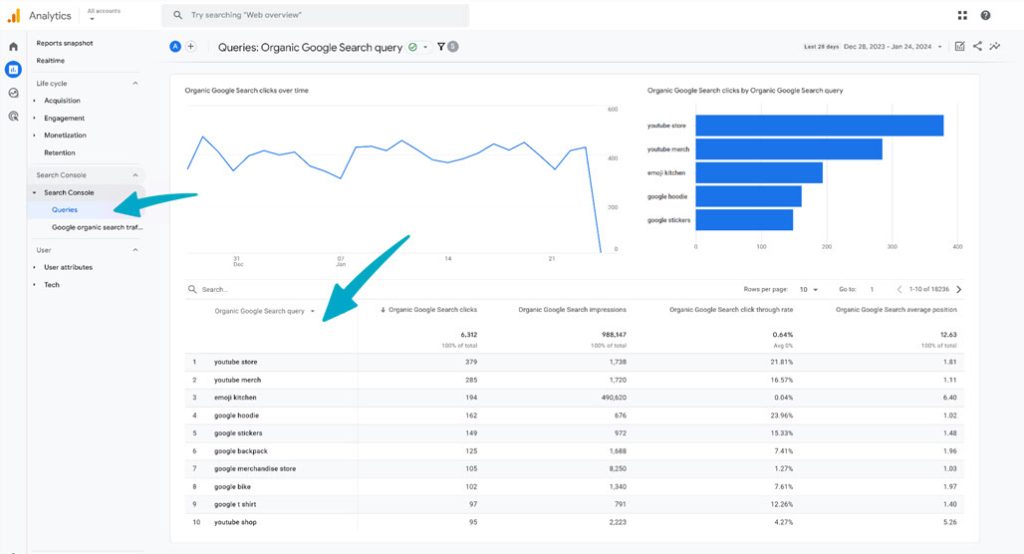
There can be contextual data you might want here as well. For example, if you're a business with multiple locations, and where local SEO plays a role in your strategy, you'll want to add location data to your map. The same goes for bilingual or multilingual websites.
Personally, I don't do this directly in my keyword mapping documents, because it's information that changes too frequently. I save that for raw keyword research documents and cross-reference them as necessary. There's no wrong way to handle it, though, so if you want to include that additional information, go for it.
Notes and required actions. It can be very helpful to have a field where you note down anything special, particular, or unusual about the page, as well as any actions you think you need to take for the page. For example, you might note down:
- If the page is overperforming compared to your expectations.
- If the page is underperforming compared to your expectations.
- If the page has had a sudden spike or drop in traffic or performance.
- If the page is on a downward trend and could use additional attention.
Gaps and content planning. The final and most useful part of a keyword map is all of the keywords and intents that you want to target, but haven't targeted yet. This is where you can plan out future content by filling in holes in your keyword map. I frequently find this to be one of the most useful tools for planning future content.
What Tools Do You Need for Keyword Mapping?
Keyword mapping can be done entirely by hand using nothing more than a spreadsheet like Google Sheets or Microsoft Excel. However, if you want to make the process faster and easier on yourself, there are some other tools you can use.
A Website Scraper Tool
The first step to putting together a keyword map is pulling data from your site. The main URL list is the biggest piece of data you'll need, but other handy information can be gathered by a scraper tool as well.
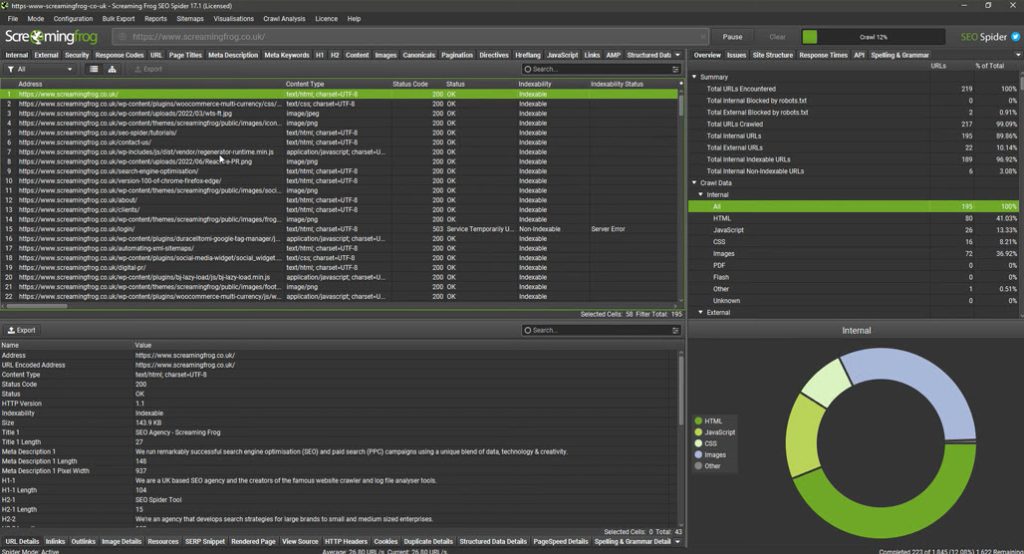
Good options include:
- Screaming Frog
- Greenflare
- SEO Macroscope
- Lumar
- Xenu's Link Sleuth
You can also put something together manually just by checking your site's XML sitemap, which will list all of your URLs for you to import into a spreadsheet.
A Keyword Research Tool
A keyword research tool, alongside any existing keyword research data you've been working with, is a foundational tool for keyword mapping. It might not come into play immediately, but if you're populating your spreadsheet with keyword metrics like competition, search volume, and even CPC data, the keyword research tool is indispensable.
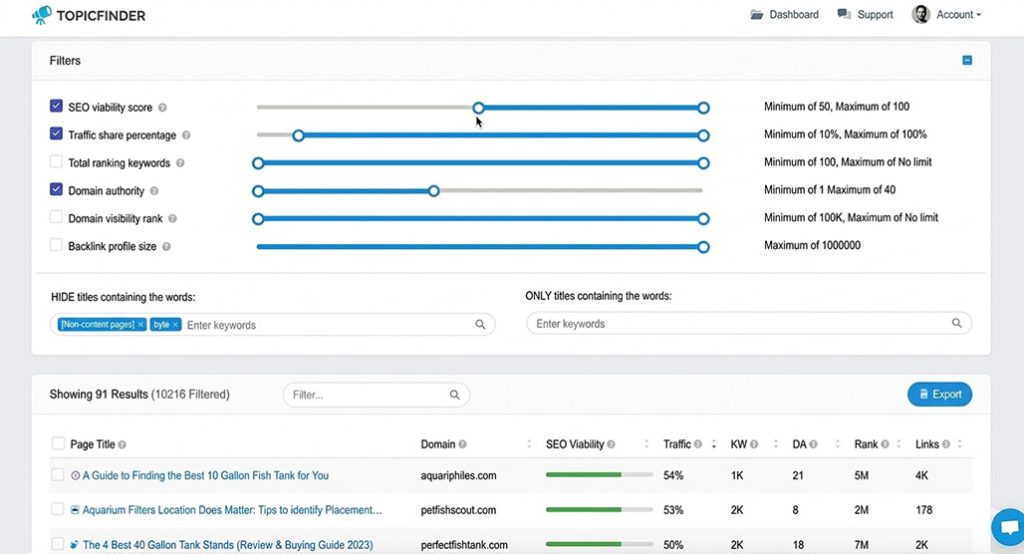
There are hundreds of keyword research tools out there, so it really depends on what tools you want to use. I'm personally a fan of Ahrefs, Semrush, Mangools, and the data you can get directly from Google via the Search Console and their Keyword Planner. You can feel free to use any tool that you trust, and that gives you the information you want.
A Keyword Extraction Tool
You can do this manually, but if your site has thousands of pages, it's a long and tedious project to do by hand. You need to know the primary and secondary keywords for each page on your site, so you can map the data. That means using a tool to identify the primary and secondary keywords of the pages on your list is crucial.

Several of the keyword research tools, like Mangools, Ahrefs, and Semrush, allow you to put in a URL or list of URLs and identify information about the pages, including keywords. You can also use AI tools for this as well.
A Keyword Clustering Tool
One of the biggest advantages of a keyword map is being able to identify and map out relationships between pages and find linking opportunities. Building these relationships is how you develop keyword clusters.
Some scraping tools and page analytics apps like SiteBulb, Audisto, or SEO PowerSuite can do this all for you. Other tools designed for the task, like LowFruits, Keyword Cupid, and Surfer SEO also work. There's no wrong answer here, so just pick the tool you like the most.
How to Build a Keyword Map
Building your keyword map is reasonably easy, but it can be tedious and time-consuming if you're doing it manually.
Step 1: Build a list of pages on your site. Your sitemap or a scraper tool does this for you easily. You'll want to have a column in your spreadsheet for each URL as your anchor point.
Step 2: Identify the primary and secondary keywords for each page. I like to have one column with the primary keyword, and another with 3-5 secondary and long-tail keywords that the page focuses on. This way, you can group URLs by the primary keyword and see the secondary keyword variations, and organize data in other ways based on the main keyword.
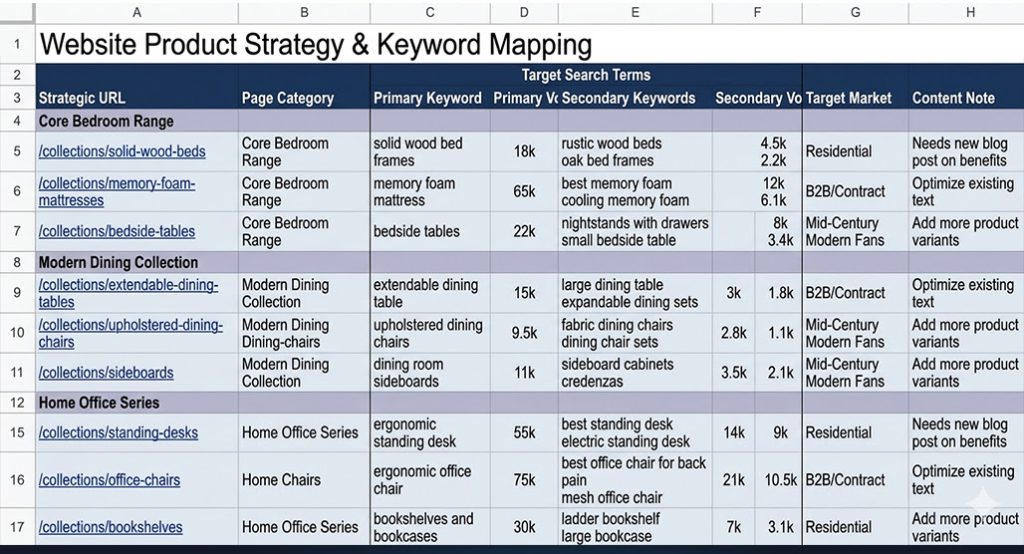
Step 3: Identify the search intent for each page. Again, because you can cover the same keyword multiple times with different search intents, it's helpful to have this data so you make sure you don't have gaps or overlaps.
Step 4: Harvest any additional data you want in your map. This can be anything from keyword search volume to page performance data to word count to page authority; if you think it's helpful, harvest and gather the data.
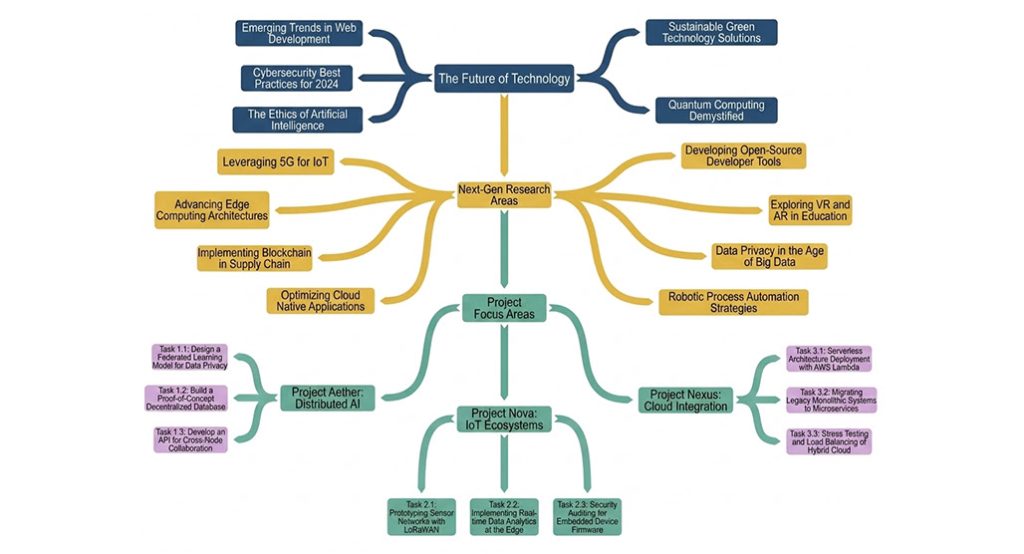
Step 5: Sort, cluster, and organize your pages. You can build a visual map of pages and draw links between pages that you have already implemented on your site, which lets you identify when new links can be added.
Step 6: Identify tasks that need to be done. Your keyword map is a handy resource you can use to look for all kinds of routes for optimization.
- Look for pages that need updating, optimizing, or improvement.
- Look for places where new links should be added.
- Look for gaps in keyword and intent coverage where new content can be created.
- Look for overlapping pages that need to be merged or where one should be changed.
Once you have a to-do list, you can prioritize it by how easy it is to do (adding links is a two-minute job), and how high-impact it is (filling high-value keyword gaps is powerful). This helps you build your future content strategy.
Step 7: Keep your keyword map maintained. As you go, when you complete tasks, add new pages, or change old pages, you'll want to update your keyword map with the information. It's relatively difficult to iteratively redo a keyword map without redoing a lot of unnecessary work, so it's best if you keep it maintained as you go.

Related Posts



Leave a Comment


Fine-tuned for competitive creators
Topicfinder is designed by a content marketing agency that writes hundreds of longform articles every month and competes at the highest level. It’s tailor-built for competitive content teams, marketers, and businesses.
Get Started